
Setting up DNS hosting and Premium DNS services
- Why do we need DNS hosting and DNS premium services
- Editing resource records in the DNS Hosting service
- Editing resource records in the Premium DNS option
- List of DNS servers for DNS Hosting and Premium DNS services
Why do we need DNS hosting and DNS premium services?
The DNS Hosting service includes modern DNS servers and an editor that allows you to easily manage zone file contents and DNS server settings. This service is available for forward or reverse domains in any top-level zones, including IDN domains. DNS servers are located in cities around the world to ensure high fault-tolerance and the fastest response times. Regardless of where your domain is registered and website is hosted, you can order DNS Hosting for 1-150 domains. Order DNS Hosting.
"Premium DNS" is a DNS hosting service designed for a single domain name only. For domains registered with Ru-Center, the "Premium DNS" service is provided free of charge with the "Optimal", "Advanced", "Advanced Plus," and "Universal" plans. If you already have a domain name, you can change its plan following the instructions.
Before you get started, you must first delegate your domain to the service DNS servers. Rucenter recommends delegating domain names to DNS-master servers following the instructions. If both a domain and DNS hosting from Rucenter are ordered, domain delegation is automatic. If you ordered DNS hosting after registering your domain with Rucenter, specify the DNS servers in the domain settings. If your domain is hosted by a third-party Registrar, you must specify the DNS servers through that Registrar.
After delegating your domain, you can set up the DNS hosting service following the instructions.
Editing resource records in the DNS Hosting service
1. To set up the DNS hosting service, go to your profile and select the DNS hosting section.

2. Select "Manage zones".
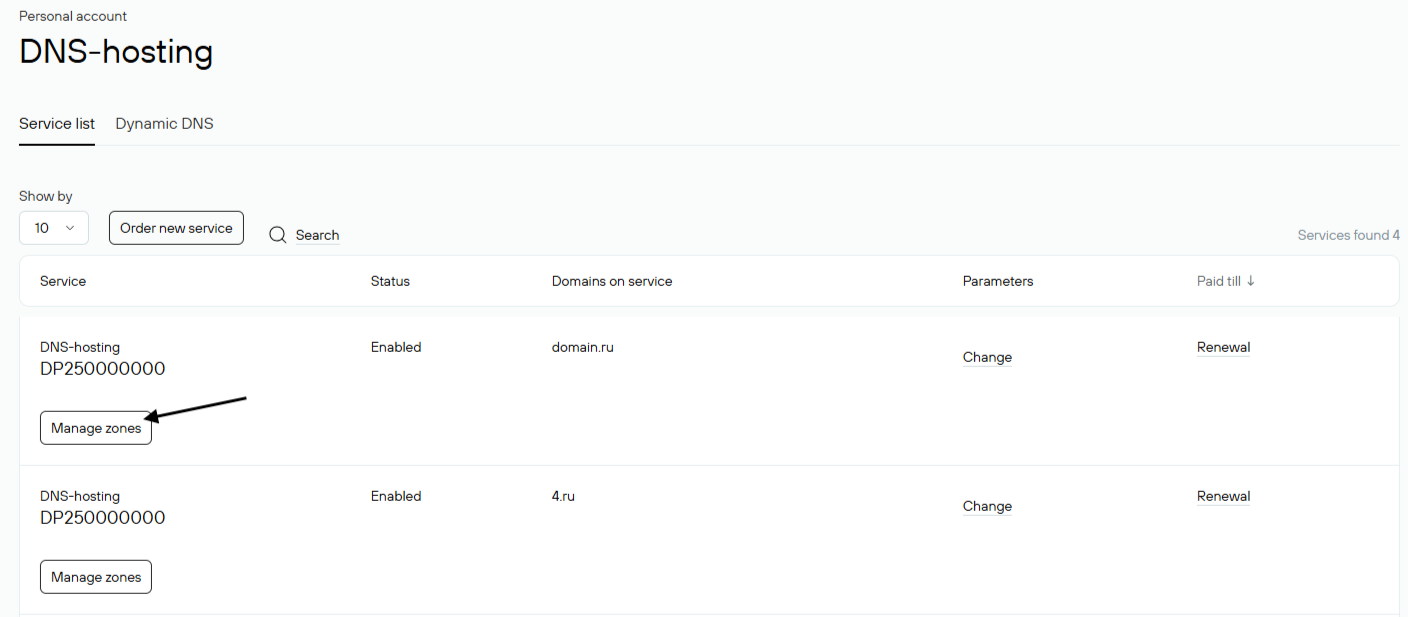
3. If you have not added a domain yet, click Add Domain and enter the domain name without the www. If the domain has already been added, click the domain name.

4. In the resource records management menu, you can enter the necessary records provided by any providers.
If you specify only "www" or "mail" in the Name field, it will be equivalent to specifying "www.example.ru" or "mail.example.ru".

Editing resource records in the Premium DNS option
1. To edit records using the "Premium DNS" option, log in to your Rucenter account and go to the "Domains" section.

2. To access the option interface, select the desired domain with the option. At the bottom of the list there will be the Premium DNS option. If it is disabled, enable it, then click Control Panel.

3. In the resource records management menu, you can enter the necessary records provided by any providers.
If you specify only "www" or "mail" in the Name field, it will be equivalent to specifying "www.example.ru" or "mail.example.ru".

List of DNS servers for DNS Hosting and Premium DNS services
- for second-level domains, such as domain.ru
| ns3-l2.nic.ru |
193.232.146.1 |
| ns4-l2.nic.ru |
91.217.20.20 |
| ns8-l2.nic.ru |
91.217.21.20 |
| ns4-cloud.nic.ru |
89.104.93.30 |
|
ns8-cloud.nic.ru |
89.104.93.31 |
- for third-level domains, such as domain.msk.ru
| ns3-l3.nic.ru |
193.232.146.5 |
| ns4-l3.nic.ru |
91.217.20.5 |
| ns8-l3.nic.ru |
91.217.21.5 |
- for fourth-level domains, such as sub.domain.spb.ru
| ns3-l4.nic.ru |
193.232.146.9 |
| ns4-l4.nic.ru |
91.217.20.9 |
| ns8-l4.nic.ru |
91.217.21.9 |
- for domains of the fifth level and higher, such as sub.sub.domain.spb.ru
| ns3-l5.nic.ru |
193.232.146.13 |
| ns4-l5.nic.ru |
91.217.20.13 |
| ns8-l5.nic.ru |
91.217.21.13 |