
DKIM, DMARC и SPF
DKIM, DMARC, and SPF are the primary mechanisms for protecting the sender's mail server from malicious emails.
SPF and DKIM confirm that the sender's domain is genuine and that emails originate from it. Without these signatures, the sender's emails will be rejected or marked as spam.
DMARC is an email processing algorithm that provides additional protection and verification for your emails.
DKIM
DKIM (Domain Keys Identified Mail) is a method for verifying sender authentication and email integrity. Using a digital signature added to the email headers, DKIM verifies that the message was sent from the specified domain and was not modified in transit. DKIM uses a public and private key pair. The private key is used to digitally sign all outgoing messages, and the public key is stored in the DNS record as a text file.
DKIM verification is performed automatically on the recipient's end. If the sender's domain is not authorized to send email, the message may be marked as suspicious or sent to the Spam folder according to the recipient's settings.
A single domain can have multiple DKIM records. For example, if you use Mandrill to send email and also send messages through Gmail, you will have two DKIM records with different identifiers.
To enable DKIM for Rucenter email, go to Mail (Почта) → your_domain → Settings (Настройки) in your hosting control panel.
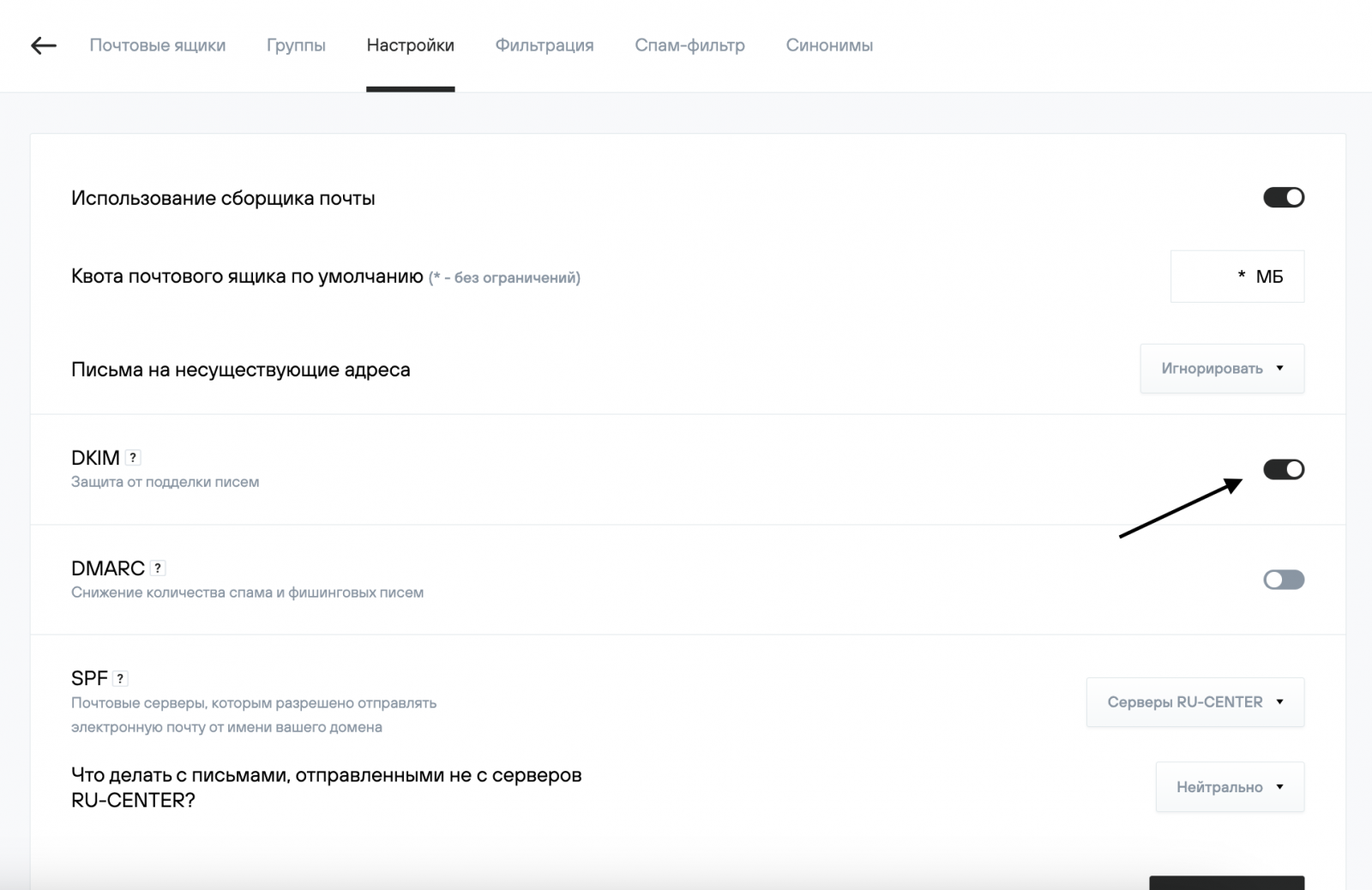
Click the toggle button, and DKIM will be enabled for your email domain.
DMARC
DMARC (Domain-based Message Authentication, Reporting, and Conformance) is a method that allows the receiving server to determine what to do with an email. DMARC uses both DKIM and SPF. If a message fails both DKIM and SPF checks, it will also fail the DMARC check. If a message passes either DKIM or SPF checks, it will also pass the DMARC check. DMARC is only added after SPF and DKIM records are configured.
To enable DMARC on Rucenter email, go to Mail (Почта) → your_domain → Settings (Настройки) in your hosting control panel.
.png)
Click the toggle, and DMARC will be enabled for your email domain. You can also select a DMARC policy for spam email: allow, mark as spam, or reject such emails.
You can find the DMARC record below your domain settings, in the list of record information.
SPF
SPF (Sender Policy Framework) is a signature containing information about the servers that can send email from your domain. Having an SPF record reduces the likelihood of your message ending up in the Spam folder.
It's important to remember that you can only have one SPF record per domain. A single SPF record can specify multiple servers (for example, if emails are sent from multiple ESPs—this is unlikely, but possible, as we'll discuss in an example later). Separate records must be created for subdomains.
On Rucenter hosting, an SPF record is automatically created, and rule management is simplified. If necessary, you can specify your own SPF record.
SPF settings are available in the hosting control panel under Mail (Почта) → your_domain → Settings (Настройки).
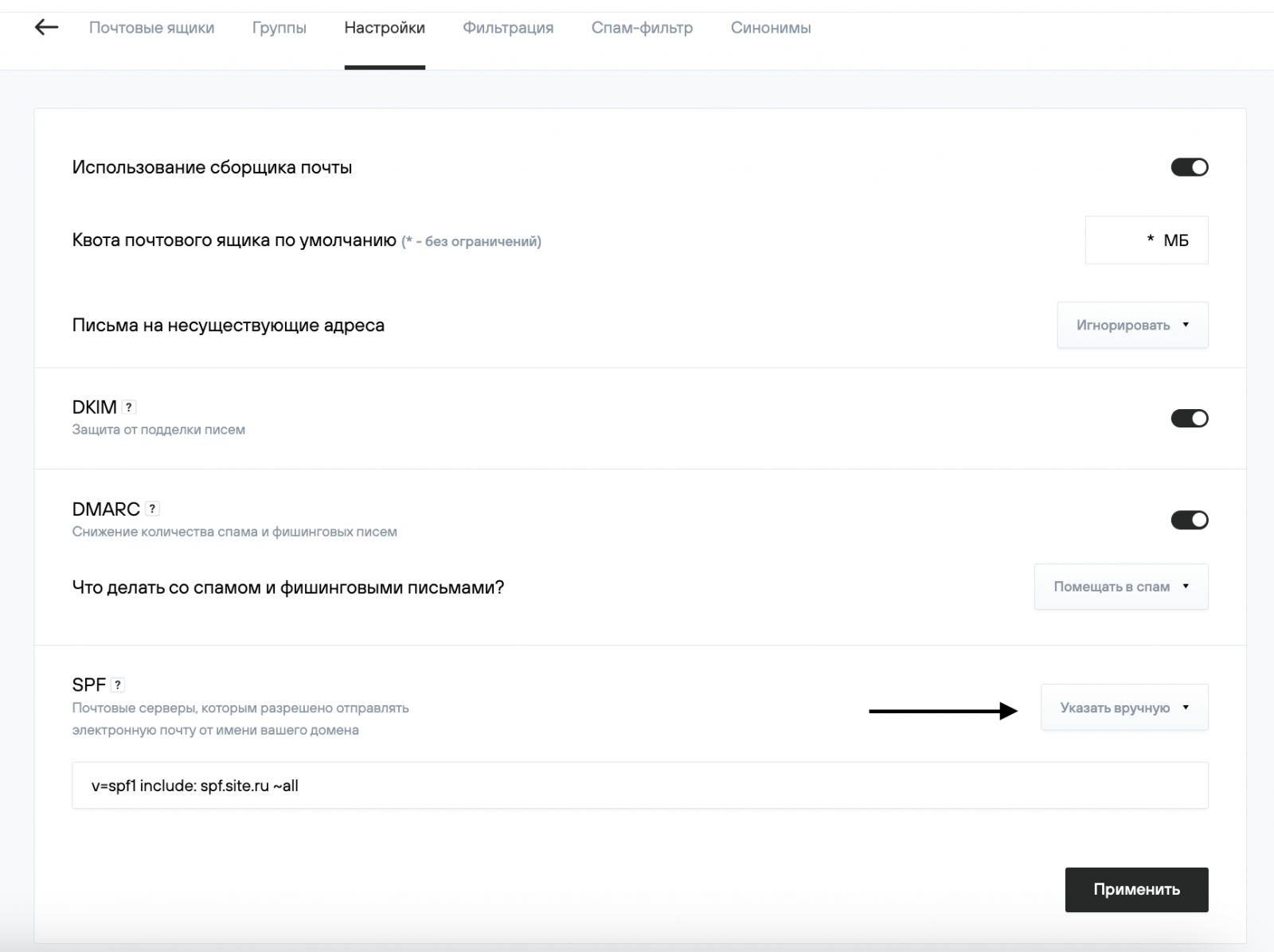
SPF Syntax
"v=spf1" — SPF version, mandatory parameter, always spf1, no other versions work;
"+" — accept emails (default);
"-" — reject;
"~" — soft rejection (the email will be accepted, but will be marked as spam);
"?" — neutral;
"mx" — includes all server addresses specified in the domain's MX records;
"ip4" — allows you to specify a specific IP address or network of addresses;
"a" — an IP address in an A record;
"include" — includes hosts allowed by the specified domain's SPF record;
"all" — all other servers not listed in the SPF record;
"ptr" — checks the sender's IP address's PTR record (allows sending to all IP addresses whose PTR record points to the specified domain) (not recommended according to RFC 7208);
"exists" — checks the domain name's functionality;
"redirect" — instructs the recipient to check the specified domain's SPF record instead of the current domain.
Since there should only be one record, you must specify all possible servers through which you send emails using the include option.
An example of an SPF record if you use Mandrill and also send emails through Gmail (multiple records within a single SPF, as mentioned earlier):
your_domain. TXT v=spf1 include:_spf.google.com include:spf.mandrillapp.com -all
The SPF record can be found below the domain settings, in the list of record information.