
Domain Security Options in Multi-access
Within Multi-access, Domain Security options can be configured according to roles. Configuration is available to the Main Administrator, Deputies, and other users with full access to the sections Data Modification and Domains.
Settings are located in the Control Panel under Active Services — Domains.
Steps: Select the desired domain. Go to the Security tab.
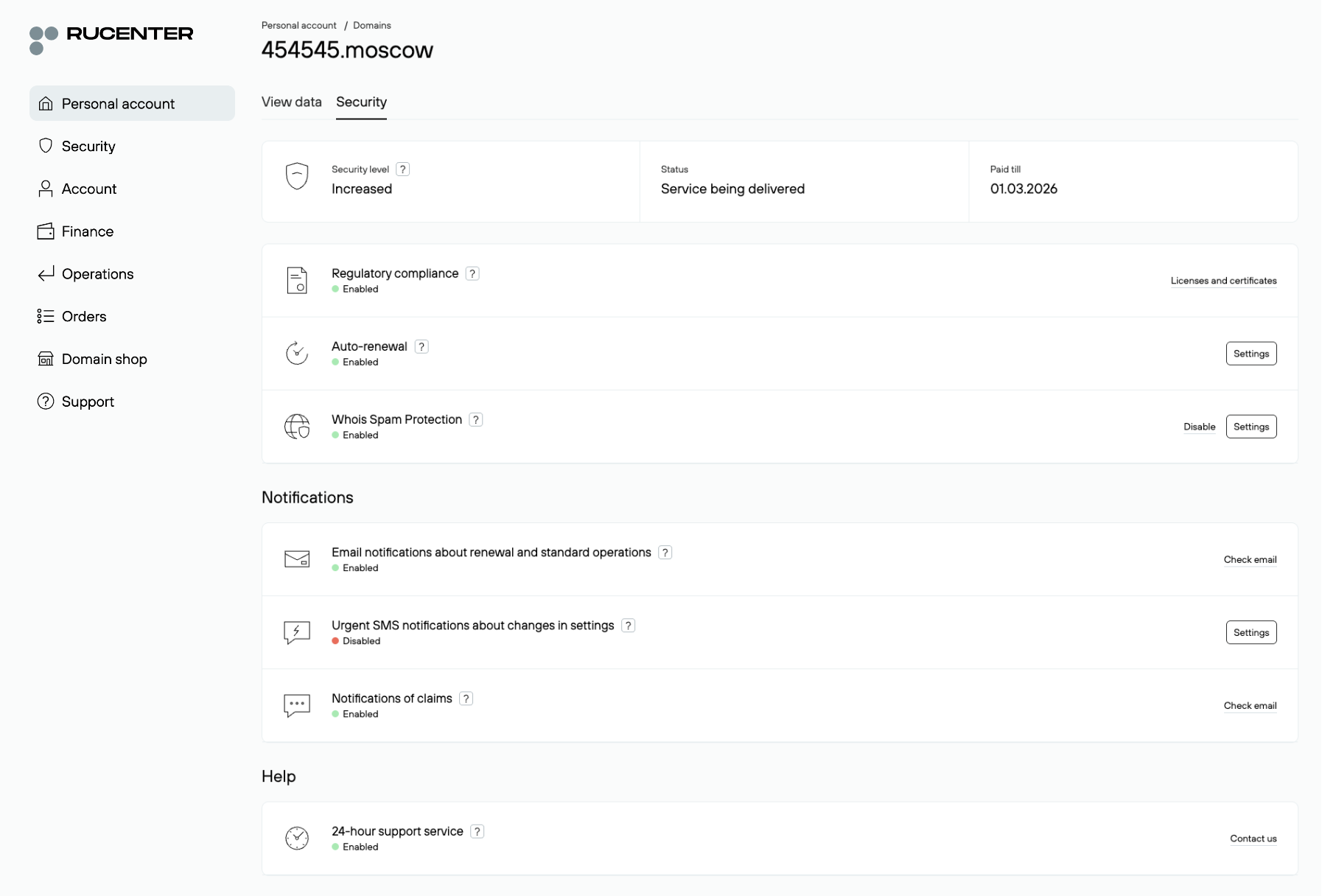
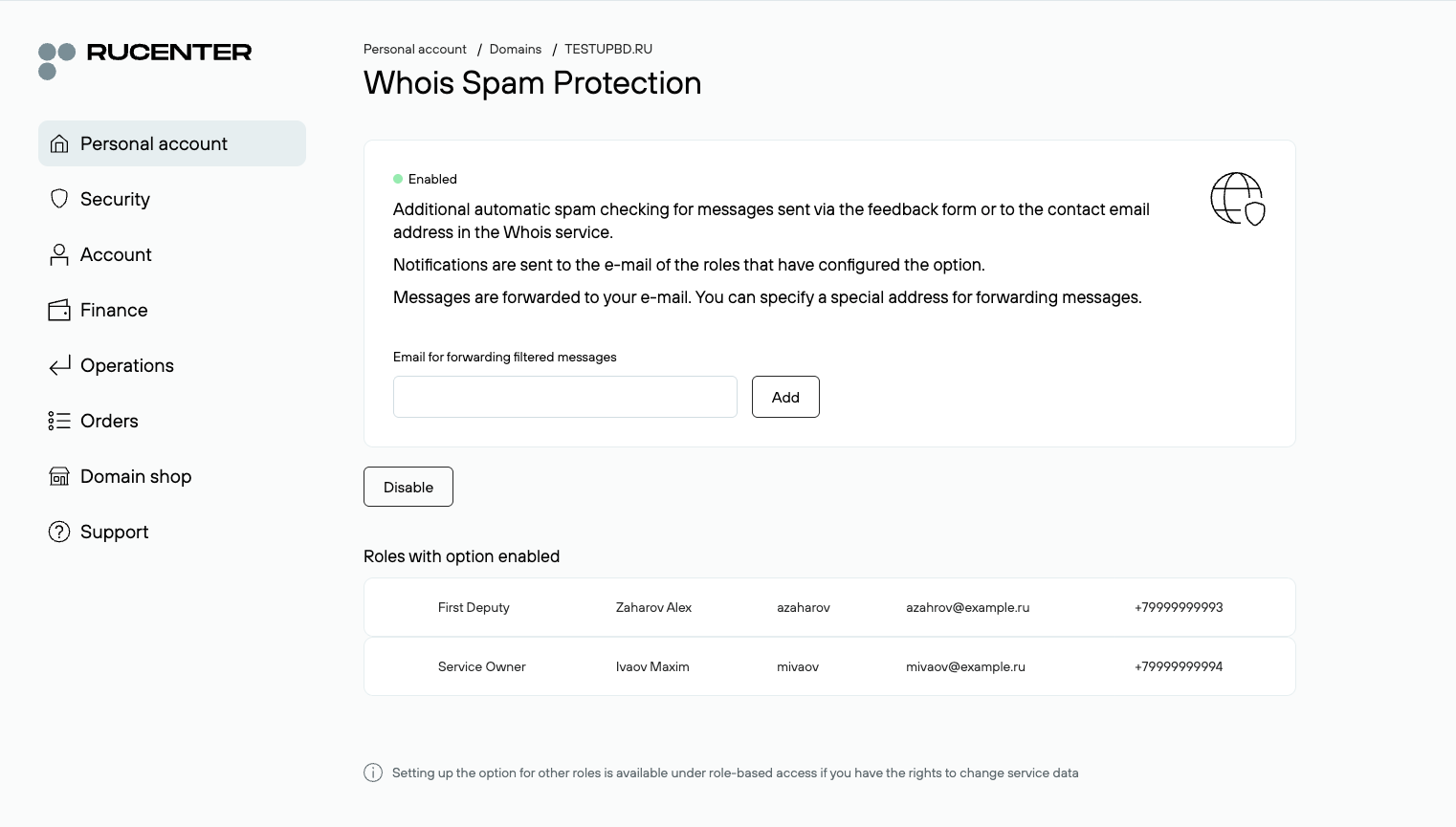
On each option’s page, the system shows whether it is enabled for the current role. The Main Administrator and Deputies additionally see a list of all roles for which the option is enabled. Other users receive a notification that the option is already active for other roles, but without a detailed list.
Domain Security Service Options
Premium DNS
Allows domain DNS record management through an online editor. After activation, a dedicated control panel becomes available where you can edit the zone file, manage records, and configure DNS.
This option can be enabled by the Main Administrator, a Deputy, or a secondary role with access rights to the Data Modification and Domains sections. Once activated, a button to access the DNS management panel appears for all roles. If the option is disabled by any role, access is revoked for all users.
Competitive Registration Monitoring
Tracks registration of similar domains in other zones. Helps identify potential risks in time, such as cybersquatting or competitor activity.
This option is configured individually by the Main Administrator, a Deputy, or a secondary role with the required rights.
Whois Query Monitoring
Generates a monthly report on the number of requests made to the domain’s data via Rucenter’s Whois service. Allows you to monitor increased interest in the domain name from third parties.
Can be enabled/disabled individually by the Main Administrator, a Deputy, or any role with access to Data Modification and Domains. After activation, reports are automatically sent to the email specified in the role’s contact details.
Website monitoring
A service for automatically monitoring website availability and scanning it for malware using Yandex and Google databases. In case of errors or suspicions, the system sends a notification to the user via email.
Website monitoring must be enabled once by the Main Administrator, a Deputy, or a secondary role with the required rights. After activation, the website status becomes visible to all roles. Notifications can be configured to be sent to two contacts: an email address and/or a phone number.
Whois Spam Protection
Filters unwanted messages sent through the feedback form or to the email address listed in the domain’s Whois data.
This option can be enabled/disabled individually by the Main Administrator, a Deputy, or a secondary role with the necessary rights. After activation, all messages are automatically forwarded to the email address specified in the role’s contact details. If necessary, the Main Administrator and Deputies can specify an alternative email address to which messages will be redirected.
Two-Factor Operation Confirmation
Adds a second layer of confirmation when performing the following domain-related operations:
- Managing the domain’s DNS servers
- Managing child DNS servers of the domain
- Suspending domain delegation
- Enabling/disabling DNSSEC
- Modifying Whois contacts
- Changing individual contact details
- Changing domain settings related to registrar change lock/unlock
- Bulk operations for .RU, .SU, .РФ domains and third-level domains
- Accessing the control panel for the Premium DNS option
- Accessing the control panel for the Website Monitoring option
- Enabling/disabling the Competitive Registration Monitoring option
- Transferring a domain from one agreement to another
- Transferring a domain to another registrar
- Changing settings, enabling/disabling options within the Domain Security service
This is a global option: only the Main Administrator or Deputies can enable or disable it. Once activated, it automatically applies to all roles of the account. When attempting to perform protected actions, the user will be prompted to confirm the operation using a second factor. The option uses the user’s current two-factor authentication settings: SMS or the Yandex.Key app.
Domain Operation Restriction
Provides additional protection against unauthorized actions. After activation, transferring a domain to another administrator will only be possible if the current owner personally visits the Rucenter office with supporting documents. This minimizes the risk of domain theft.
The option can be enabled only by the Main Administrator or Deputies and applies to all roles simultaneously. Disabling the option is possible only with the domain owner’s personal presence at the Rucenter office.
Urgent SMS Notifications on Settings Changes
Provides instant alerts about important events, such as changes to DNS servers, changes of domain registrant, changes of registrar, requests to disable the domain. This allows users to quickly react to any suspicious actions.
The option is available to the Main Administrator, Deputies, and secondary roles with the necessary rights. Notifications are sent to the phone number specified in the role’s settings and follow the general SMS notification parameters (time, language, time zone).
Emergency Notifications
Automatic SMS alerts in case of domain registration expiration, suspension due to non-payment, domain deletion Helps ensure you don’t miss renewal deadlines and keep control of your domain.
Available to the Main Administrator, Deputies, and secondary roles with the required rights. Messages are sent to the phone number listed in the role’s contact details.
Free Change of Registrant
A procedure for transferring domain ownership rights without additional fees. The option does not require special configuration and is available by default to the Main Administrator, Deputies, and secondary roles with access to the Data Modification and Domains sections.
Domain Ownership Certificate
Allows requesting an official certificate confirming that the domain is registered to the company. The document is issued on official letterhead with signature and seal. Available by default to the Main Administrator, Deputies, and secondary roles with access rights to Data Modification and Domains.
Security Options During Service Suspension or Deletion
If the Multi-access service is temporarily suspended (e.g., due to non-payment), some security options continue working: Settings configured by the Main Administrator are preserved and remain active. Options configured by other users are temporarily disabled. Once access to Multi-access is restored, all settings are automatically reinstated.
If the Domain Security service is fully disabled, all options stop working and their settings are deleted. Deleted settings cannot be restored.
If the domain administrator changes, all security settings are reset. The new administrator must reconfigure the options, including — if necessary — granting rights to other users.