
Mailing groups
1. Creating a mailing group.
2. Configuring a mailing group.
3. Adding addresses to a group.
4. Managing subscribers.
A mailing group is a shared address for multiple mailboxes. An email sent to the group address will be delivered to all addresses included in the group. All group members are equal and can send and receive messages using the group address.
Mailing groups are recommended for organizing collaborative work among your employees. Emails sent from addresses that are not members of the group will also be delivered to the mailing group.
For example, you can create a group “buh” for accounting, a group “managers” for managers, and a group “all” that includes the “buh” and “managers” groups as well as the director mailbox. When sending an email from the director mailbox to the “all” group address, the message will be delivered to all managers and accounting staff. You will not need to add all recipients to the “all” group again.
Creating a mailing group
To create a mailing group in the hosting control panel, go to Mail (Почта) → your_domain → Groups (Группы).
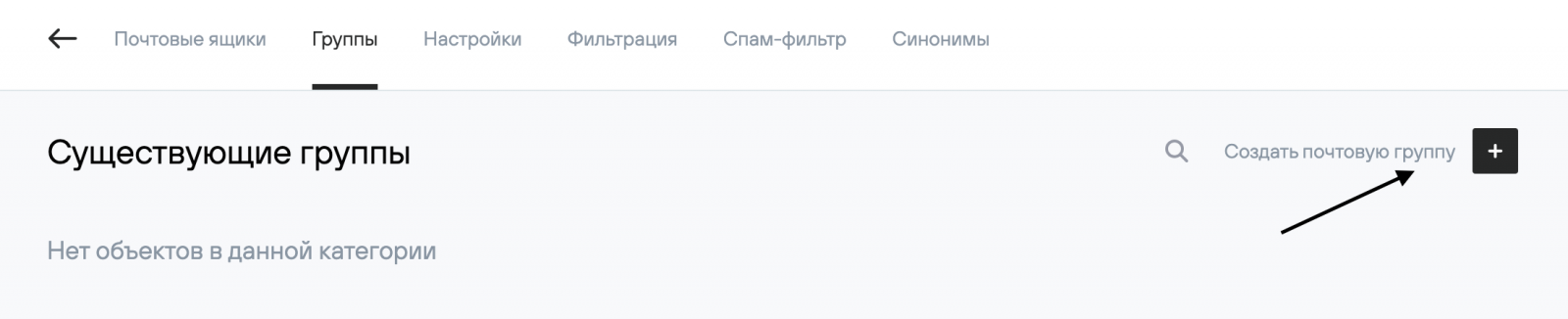
Click the Create mailing group (Создать почтовую группу) button and specify the main settings.
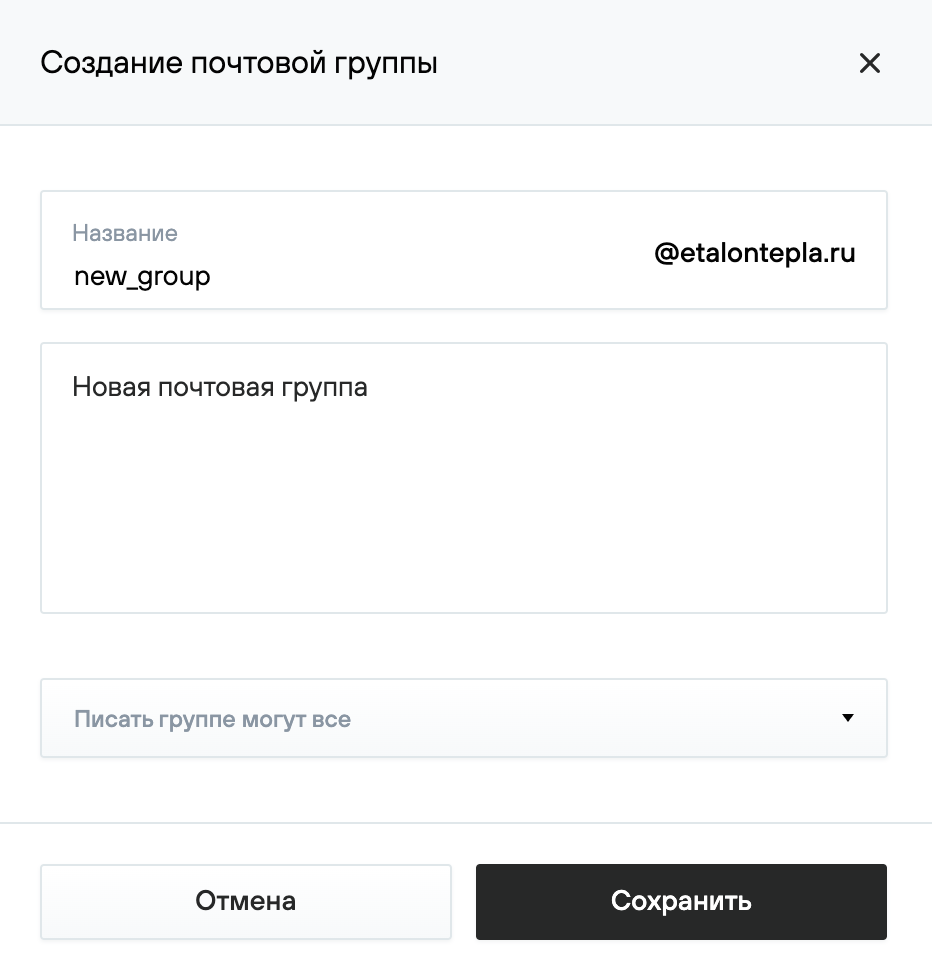
“Name”. The group address.
“Comment”. A short description of the group.
Set the permissions for sending messages to the group:
- “Anyone can send to the group”. Emails to the group address will be accepted from any sender;
- “Only the owner can send to the group”. In this case, you must select an existing mailbox in the domain that will be the group owner. Only messages from the owner will be accepted;
- “Only subscribers can send to the group”. Only messages from addresses included in the group will be accepted.
Click the Save button.
2. Configuring a mailing group
Click the Group settings (Настройки группы) button and specify the required parameters in the pop-up window.

The following settings are available for mailing groups:
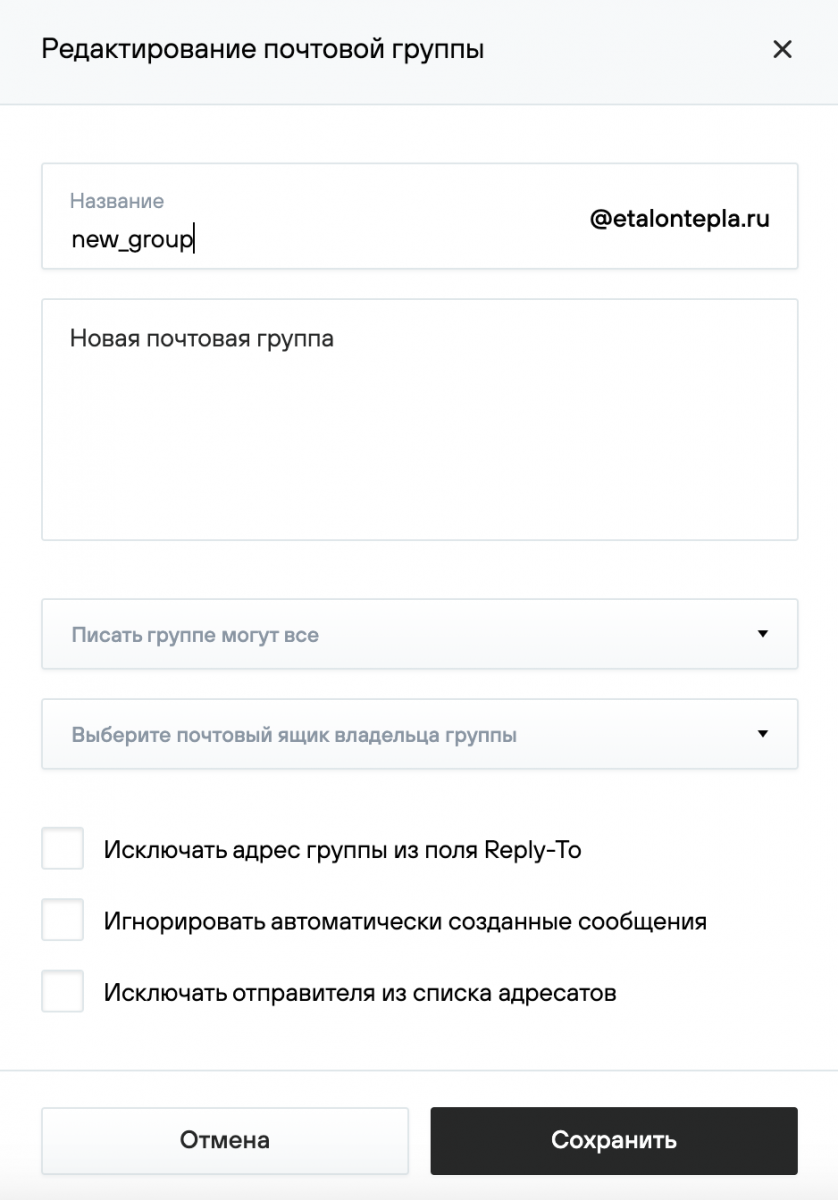
“Exclude group address from the Reply-To field”:
- “Enabled”. The sender’s address will be used as the reply-to address for messages sent to the group. When replying to such a message, the reply will be sent to the original sender.
- “Disabled”. A Reply-To header containing the group address will be added to messages sent to the group. When replying to such a message, the reply will be sent to the group address rather than to the sender.
“Ignore automatically generated messages”. Allows you to configure how messages generated by mail servers are handled:
- “Enabled”. All automatically generated messages (containing the headers Precedence: bulk, Precedence: junk, Precedence: list, X-List*, X-Mirror*, X-Auto* (except X-Auto-Response-Suppress), X-Mailing-List, Auto-*, messages with an empty Return-Path), including messages sent via mailing lists or groups (in the case of nested groups), will be ignored.
- “Disabled”. It is recommended to set this option if you want to receive all messages sent to the group address.
“Exclude sender from recipient list”:
- “Enabled”. A group member will not receive messages that they themselves sent to the group address.
- “Disabled”. In this case, a group member will receive messages that they themselves sent to the group address.
3. Adding addresses to a group
To add a new address to a mailing group:
- click the Add mailbox (Добавить почтовый ящик) button;
- select a mailbox in your domain or specify an external address;
- click the Add (Добавить) button.

4. Managing subscribers
On the mailing group page, in the Group members (Состав группы) section, you can view the list of addresses included in the group and modify their settings.
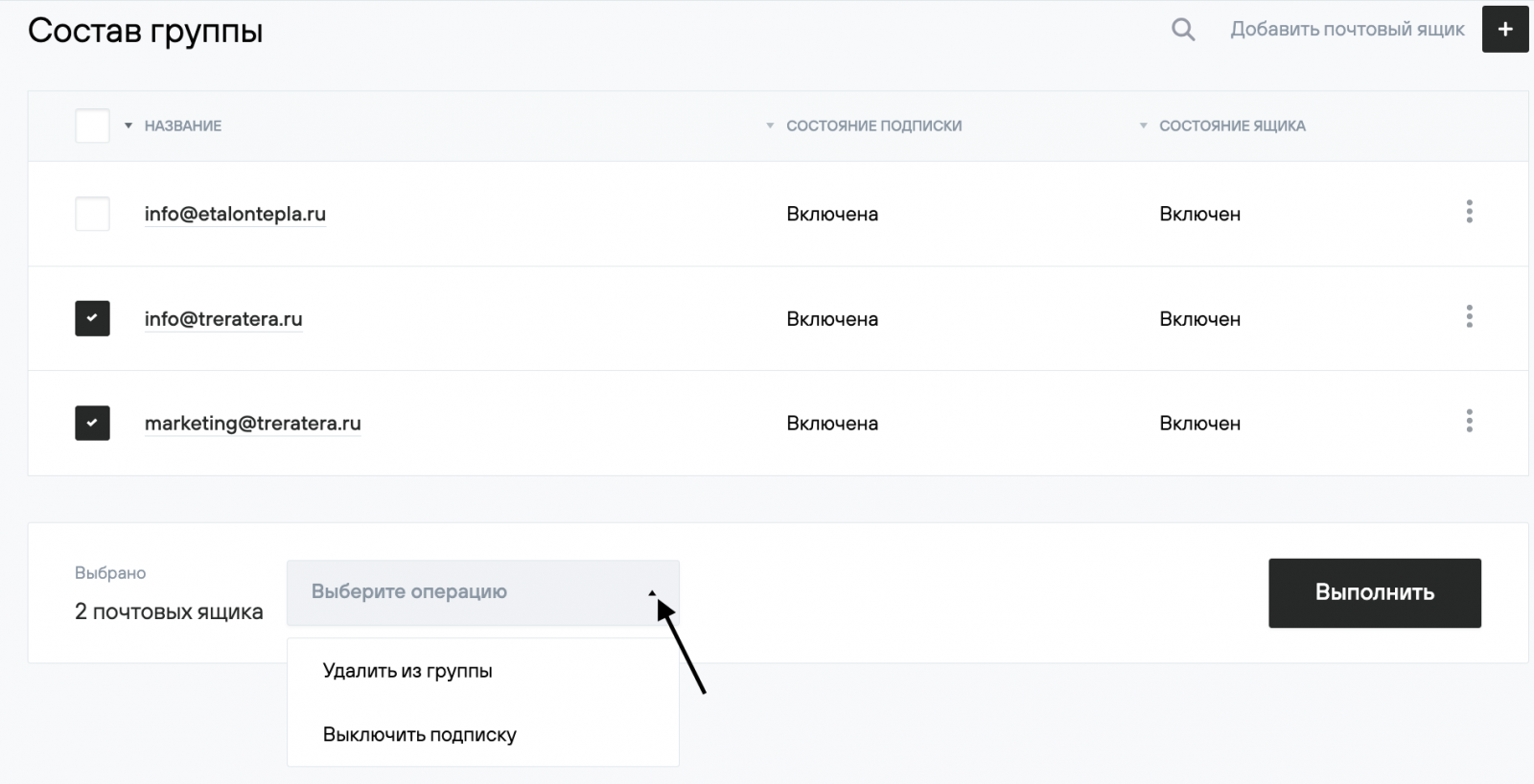
“Subscription status”. If the subscription is enabled, the group member will receive messages sent to the group address. If the subscription is disabled, messages will not be delivered.
“Mailbox status”. If the mailbox is enabled, it can send and receive messages, and access to the webmail interface is available. If the mailbox is disabled, sending and receiving messages is not possible, and access to the webmail interface is blocked.
On the same page, the following bulk actions are available for group addresses:
- Remove from group – removes the address from the group, without deleting the mailbox;
- Disable subscription – stops receiving messages sent to the group address;
- Disable mailbox – disables sending and receiving messages and blocks webmail access (available for addresses within the group domain);
- Clear Deleted (Trash) – deletes all messages in the Deleted folders (available for addresses within the group domain);
- Clear Spam – deletes all messages in the Spam folder (available for addresses within the group domain);
- Clear all messages – deletes all messages in all folders (available for addresses within the group domain).
In the Group members (Состав группы) section, select the mailboxes to apply an action to, choose an action from the dropdown menu, and click Execute (Выполнить).